
Know if the sprint fits before you commit it.
Jira knows the work. It doesn't know the week. Capacity Compass takes your team's hours, subtracts the meetings, leave and support nobody put on the board, and sets what's left against the work assigned in Jira.
- Reads Jira, never writes to it
- Built for Scrum boards on Jira Cloud
336h gross − 100h activities = 236h net, against 268h assigned
Every sprint carries weight that isn't on the board.
Velocity and story points only tell you how much work is on the board. The hours that sink a sprint live somewhere else.
| Aboard, not on the board | Where it hides | In the sample sprint |
|---|---|---|
| Ceremonies and standing meetings | Standup, refinement, planning, review and retro, every sprint, for everyone. | 28h |
| Leave and holidays | Booked weeks ago in a calendar or HR system, never in Jira. | 48h |
| Support and on-call | Someone is carrying the pager and still has tickets assigned. | 16h |
| One-off interruptions | An interview panel, an incident review, a 1:1 that ran long. | 8h |
| Hours that were never available for Jira work | 100h | |
One subtraction, one verdict.
Three figures drive everything Capacity Compass tells you. They are always in hours, because holidays and standups aren't measured in points.
- GrossThe hours each person is actually at work this sprint.
- ActivitiesMeetings, ceremonies and one-off interruptions.
- NetThe hours genuinely left for Jira work.
Net capacity is set against the estimated hours of the issues assigned in Jira, for the team and for every person. Capacity Compass checks load, commitment and meeting overhead, and reports the worst of the three, in words as well as colour:
- 8.5h to spare The work fits, with room left.
- Nearly full Within capacity, but one sick day puts it over.
- 12h over capacity Rebalance or cut scope now, not on day nine.
- 2 people over capacity The total fits, but some people are overloaded.
Estimate in story points? Capacity Compass converts them to hours on a scale your team controls.
It lives inside Jira.
Capacity Compass appears as Board Planning in the sidebar of your Jira software project. Nothing to install on anyone's machine and no second tool to keep in sync.
See the whole team at once
Gross, activities, net and assigned hours for every person, with a status for each. The bars show who is overloaded even when the team total balances.
How to read the verdict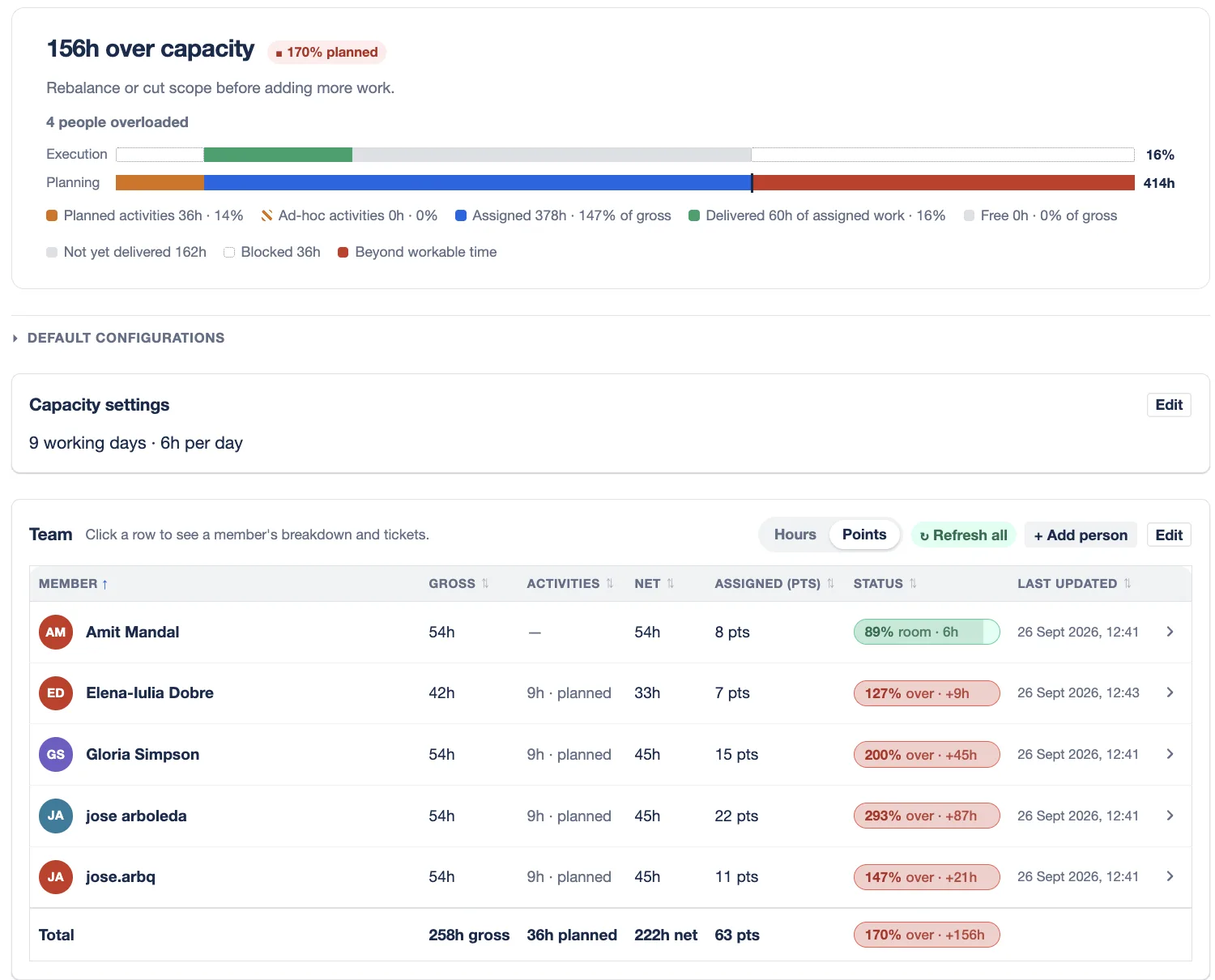
Everyone checks in their own week
Team members report days off and hours off, see the meetings they're booked into, and see how their assigned issues fit, before the sprint starts.
Check your own availability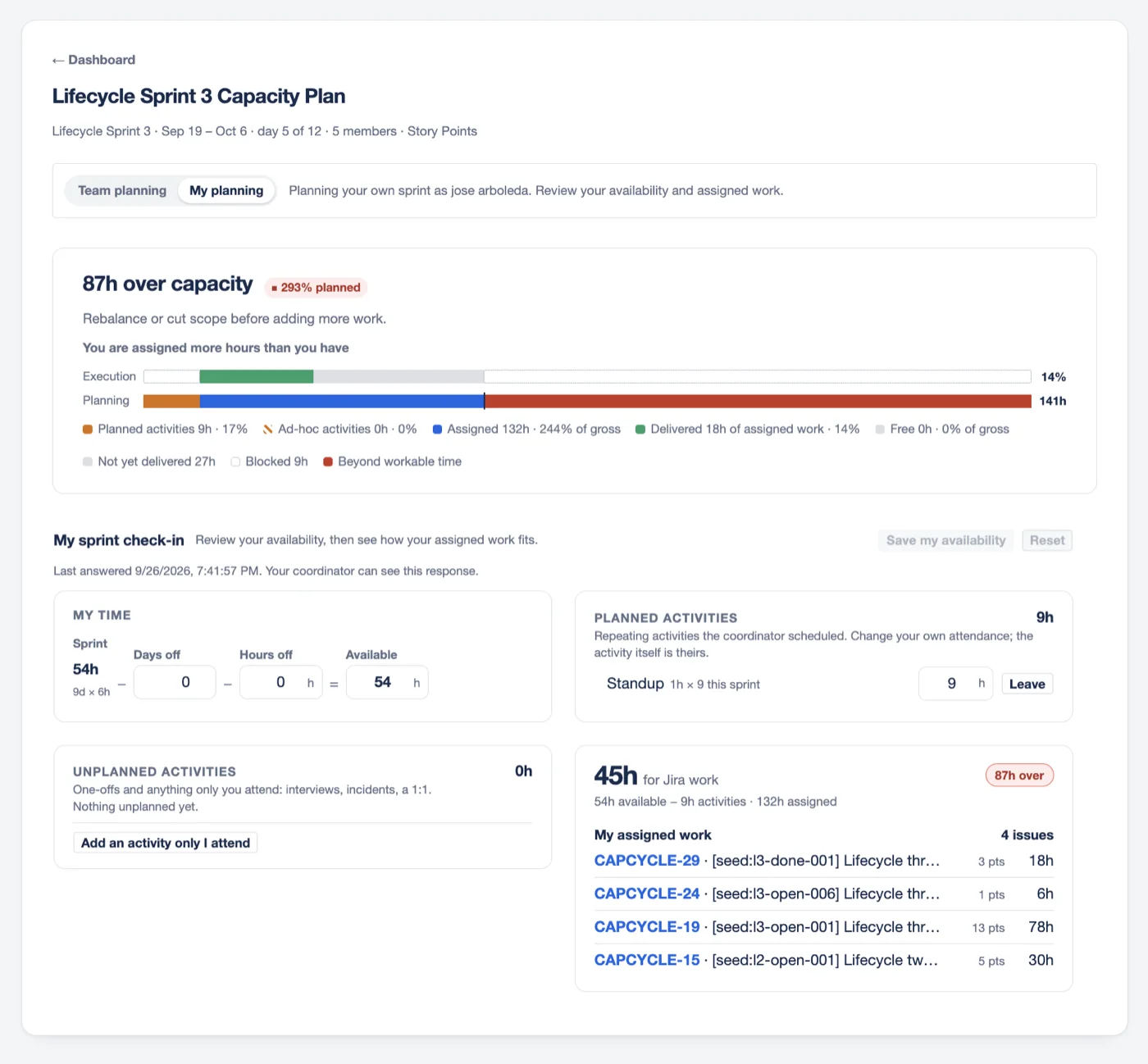
Commit to what your team actually delivers
Tracking looks back at closed sprints: what was committed, what grew, what was delivered. It then recommends a commitment range for the next one.
Track how your sprints are going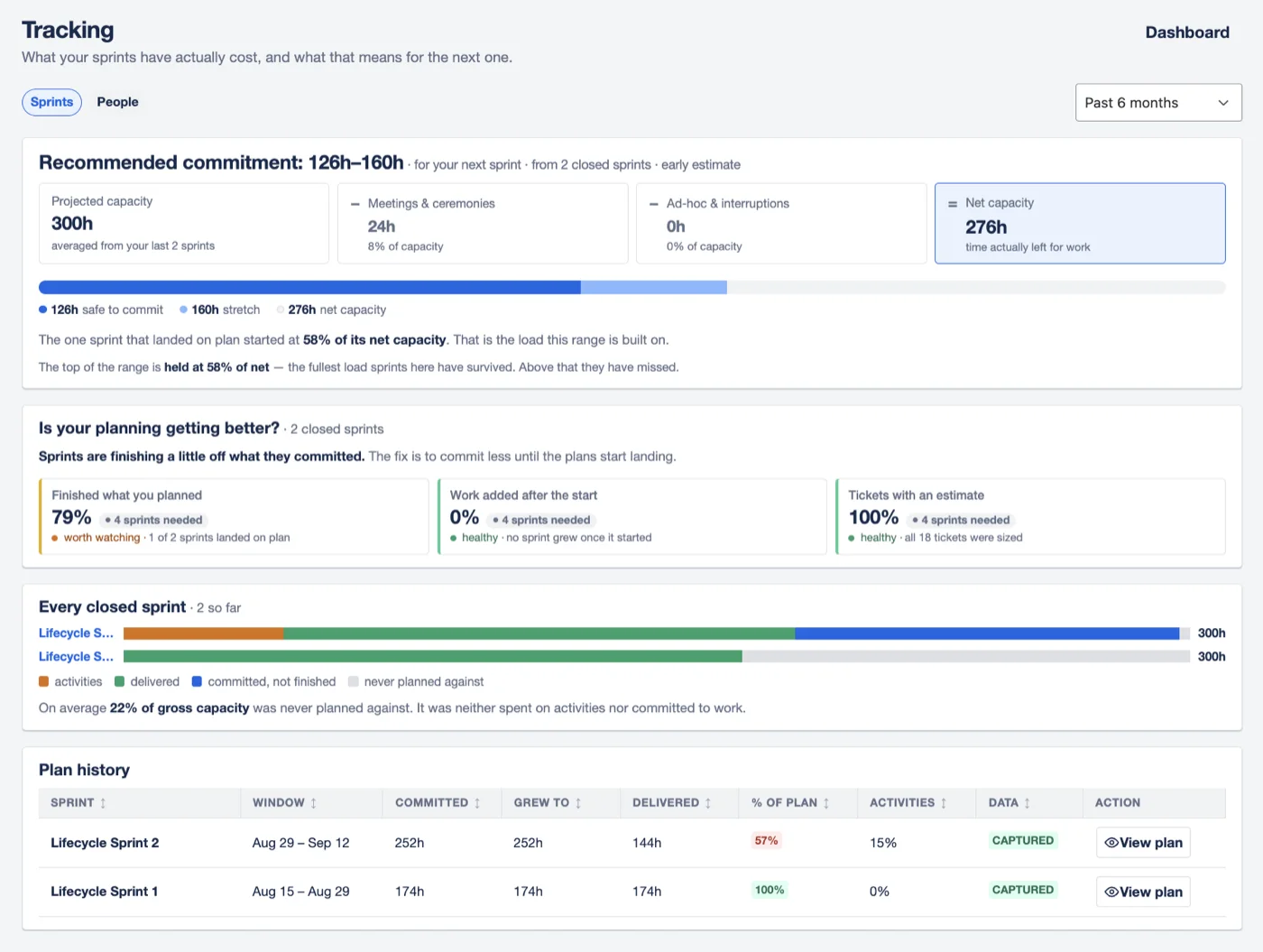
Every plan, and how it ended
The landing screen lists your sprint plans and their outcomes. Start a new plan, or carry last sprint's team and meetings forward and change only what changed.
Reuse a previous plan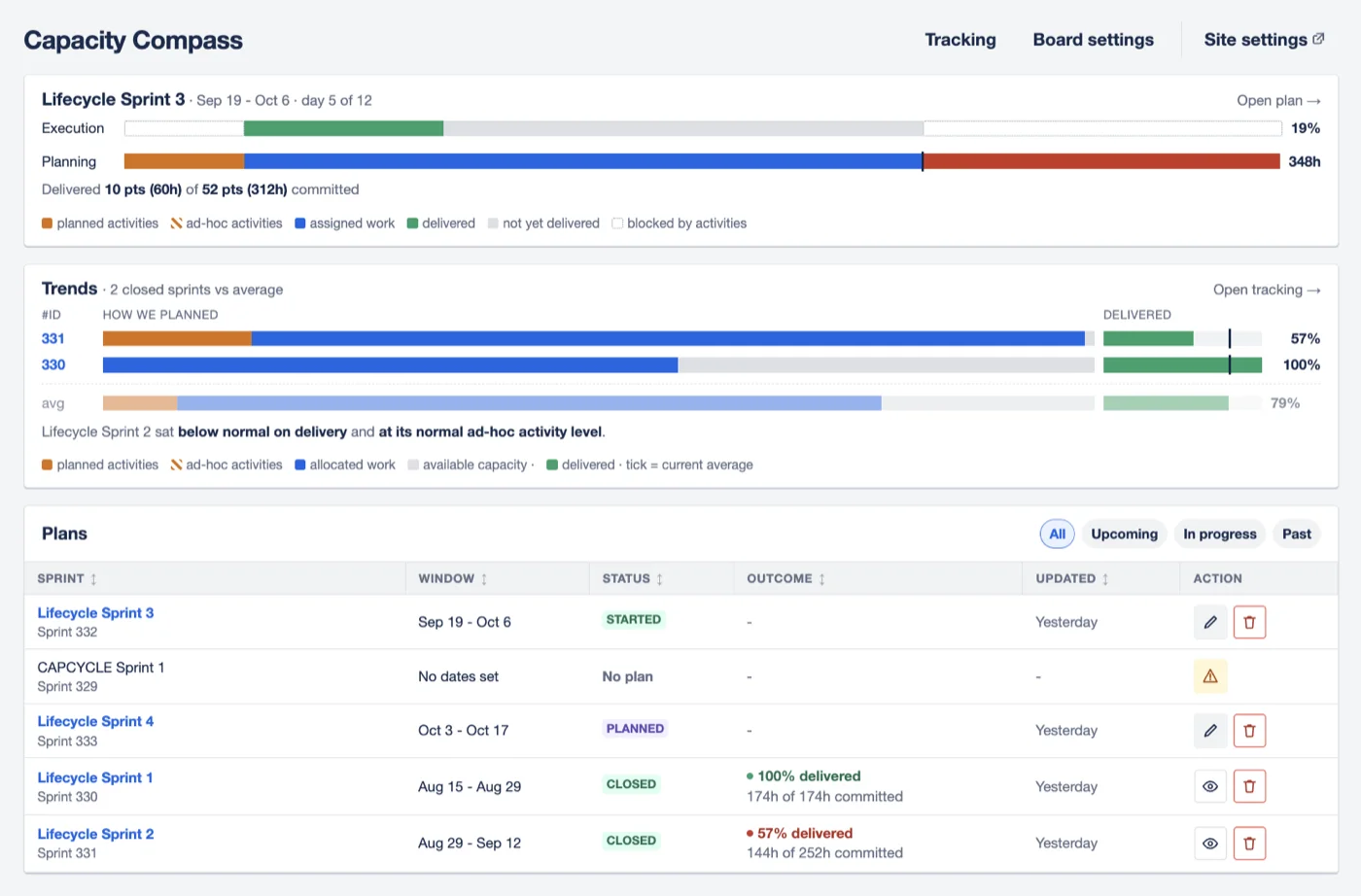
Read-only, by design.
It never changes your Jira data
No issues are created, edited, assigned, transitioned or commented on. Your plan lives in the app.
Your data stays in Atlassian's cloud
Built on Atlassian Forge, with its own database for your site. Nothing is sent to Trisolas or any third party, and you keep all rights to your data.
Plans sprints, not people
Tracking asks whether sprints landed where they were planned. It never ranks who was fastest.
For everyone in the planning meeting.
-
If you plan the sprint
Set the team's hours, record the meetings that eat into them, and decide whether the sprint is a safe commitment.
Create a sprint plan -
If you're on the team
Report your own availability and see how your assigned work fits before anyone commits it for you.
Check your availability -
If you run Jira
Choose which boards use Capacity Compass and set the defaults every new project inherits.
Admin guide
Questions teams ask first
Where is our data stored?
Inside Atlassian's cloud. Capacity Compass is built on Atlassian Forge, so it runs on Atlassian's infrastructure and keeps your plans in a database Atlassian provisions for your Jira site's installation alone. It follows your site's data residency location where Atlassian supports data residency for Forge apps.
Does any of our data leave Atlassian?
No. The app has no servers of its own and declares no external network destinations. Nothing is sent to Trisolas or to any third party, and there are no analytics or tracking. Trisolas has no way to view or export the data stored in your installation.
Who owns the data?
You do. You keep all rights in the data your team enters and in the data the app reads from Jira. If you uninstall the app, Atlassian deletes its stored data after a short retention period, currently 28 days.
Will it change anything in Jira?
Never. It reads the sprint, its issues and their assignees. It holds no Jira write permission, so it cannot create, edit, assign or transition issues.
Does it work with Kanban boards?
No. Capacity Compass plans Scrum sprints, and Kanban boards have no sprint to plan against.
We estimate in story points. Does that work?
Yes. Capacity Compass converts story points to hours using a scale you control. Capacity itself is always in hours.
Who can create and edit plans?
Anyone who can view the project can open plans and report their own availability. Project administrators create and edit plans and board settings. Jira administrators manage site-wide defaults.
How much does it cost?
Capacity Compass is available on the Atlassian Marketplace, with a free trial. See the Marketplace listing for current pricing.
Full details: Privacy policy · What Capacity Compass reads from Jira
Plan your next sprint to the line.
Install Capacity Compass from the Atlassian Marketplace and set up your first plan in minutes.