
Understand your capacity result
The verdict sits at the top of the plan board and answers the question the plan exists for: is this sprint a safe commitment?
What you see
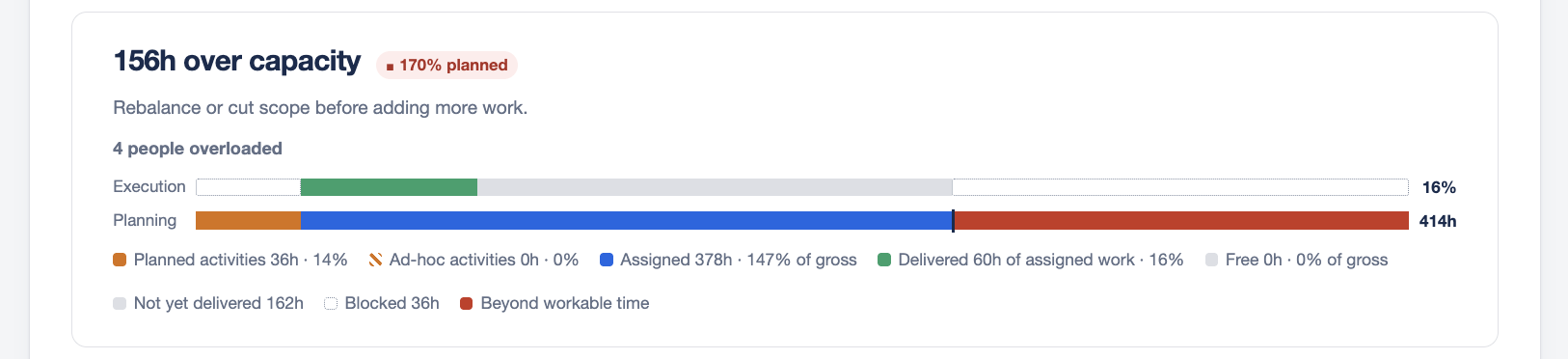
The verdict has four parts:
- A headline stating the finding in words, for example 12h over capacity or 8.5h to spare.
- A percentage of workable time planned.
- A supporting line saying what to do, or describing the state when nothing needs doing.
- Two bars, Planning and Execution, drawn on the same scale.
The state is always written in words as well as shown in colour, so the verdict is readable without relying on colour.
The three things it checks
Capacity Compass checks three independent things and reports the worst of them. It never averages them, because an average hides the one that is failing.
| Check | Question | Fails when |
|---|---|---|
| Load | Will someone drown? | Assigned work is too close to, or past, net capacity |
| Commitment | Is the sprint actually decided? | Too little work has been committed |
| Overhead | Is ceremony eating the sprint? | Meetings take too large a share of gross capacity |
A sprint that is only 13% planned but loses 39% of its hours to meetings has a real problem. Checking load alone would call that healthy.
What each verdict means
Xh to spare
All three checks pass. The work fits with room left. Nothing to do.
Exactly at capacity
The work fits with nothing left over. Sound, with no slack for anything unexpected.
Nearly full
Committed work fills 90% or more of net capacity. Still within capacity, but one sick day or one spillover ticket puts it over. Leave a buffer before adding more work.
Xh over capacity
Committed work exceeds available capacity. Rebalance or cut scope before adding anything else.
N people over capacity
The team total may fit, but specific people are assigned more than they can do. A plan that balances on average and fails per person still fails. Look at the Status column in the Team panel to see who.
Room to hold more
Less than 35% of workable time is committed. The rest of the sprint is undecided. Either the sprint is not planned yet, or work is missing estimates.
Nothing committed yet
No assigned work at all. Usually means issues have not been assigned in Jira, or the assigned issues carry no estimates.
Meetings are the largest draw on capacity
Ceremonies take 30% or more of gross capacity before any work is planned. Worth reviewing before filling the rest.
Meetings take most of this sprint
Ceremonies take 45% or more of gross capacity. At this level meetings outrank other findings, because almost half the sprint is gone before work begins.
Reading the two bars
Planning shows how the whole of gross capacity is composed: planned activities, ad-hoc activities, assigned work, and hours still free.
Execution shows delivery against the same scale, but its track spans only workable time, because delivery can never happen inside the hours meetings have taken.
Work that runs past workable time is not hidden. It is drawn in the over tone, both for assigned work beyond the ceiling and for delivery beyond it. Delivery past the ceiling is a real outcome worth seeing, not an error.
The signals line
Beneath the supporting line, two counts:
- People overloaded. How many are assigned more than their own net capacity.
- Issues missing an estimate. Assigned issues with no estimate, which contribute nothing to the figures. This is capacity you are committing to blind.
The percentage
The percentage is assigned work as a share of net capacity, not gross. It answers how full the hours you actually have are.
Where meetings have consumed all available capacity and work is still assigned, the percentage shows as greater than 100.
What to do about a bad verdict
| If it says | Try |
|---|---|
| Over capacity | Move issues out of the sprint in Jira, or check whether estimates are inflated |
| Specific people over | Reassign issues from the overloaded people to those with room |
| Nearly full | Leave it if the team is confident, but add nothing more |
| Room to hold more | Check for assigned issues with no estimate, then pull more work in |
| Meetings dominate | Review attendee lists. Not everyone needs to be at everything |
Over several sprints, Track how your sprints are going shows whether your estimates are the real problem.